


Q1 was a proof-of-concept quarter. Not just for the features we shipped, but for the kind of platform MachineMetrics is becoming.
We released meaningful updates across scheduling, configuration, and the operator experience. We took the platform to ProveIt! and demonstrated it could stretch far beyond its home environment. We brought five customers into a room and let them build on it themselves.
What came out of Q1 isn't just a list of releases. It's early evidence of where this is going.
Faster Configuration, Fewer Bottlenecks
Getting machines connected and configured has historically been one of the most hands-on parts of going live, whether for a new customer or one adding capacity at an existing site. Two Q1 releases make that process faster and more self-sufficient.
The Machine Data Mapping Tools are now embedded directly in the Machine Edit form. Previously available only as a standalone lab, the mapping editor now lives exactly where configuration work happens. A spreadsheet-like interface makes it straightforward to edit, review, and update data mappings without switching contexts. A live values panel shows incoming data in real time as items are mapped, and a version diff view makes it clear what will change before any changes are applied.
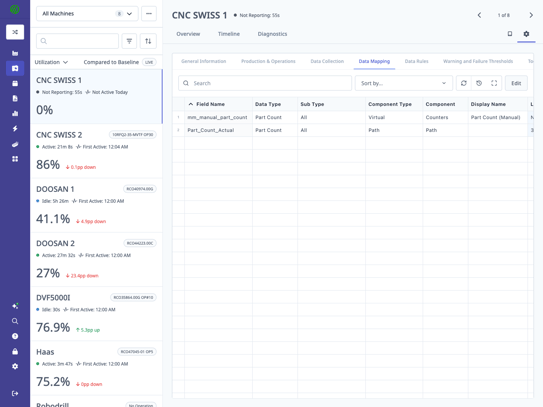
The Bulk Machine Configurator is now a built-in step in the Machine Edit form, called Copy Profile. If you have a machine configured correctly, you can copy its adapter script and data mappings to any number of other machines without leaving the form. For facilities adding machines of the same type, or multi-site teams standardizing configurations across locations, this removes a step that used to require manual effort at each machine.
Together, these two changes reduce the time it takes to bring new machines online and give customers more control over configuration without needing to loop in engineering support.
Scheduling That Reflects What the Floor Is Actually Doing
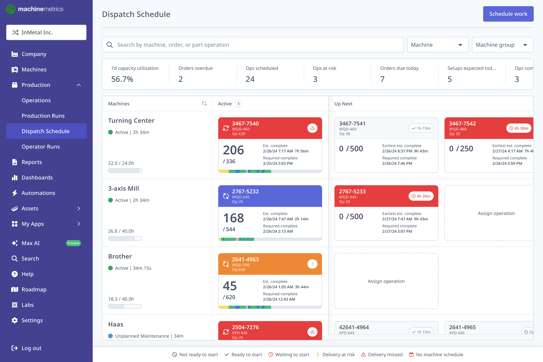
The scheduling page has a new name in Q1: the Dispatch Schedule. It better reflects what the tool is actually doing — telling operators what to run, when to run it, and keeping that answer current as conditions on the floor change.
Along with the rename, we made the experience meaningfully easier to navigate. Operation cards in edit mode now open work order details without leaving the schedule view, and the Unscheduled column received the same treatment. Import validation errors now include direct links to the specific operation causing the issue, so planners can resolve conflicts in seconds instead of hunting through a list.
ShopPulse: More Precision, More Flexibility
What was previously called the Operator Dashboard is now ShopPulse. The new name better reflects how operators experience it on the floor, and it comes with two capability updates that shipped alongside the rename.
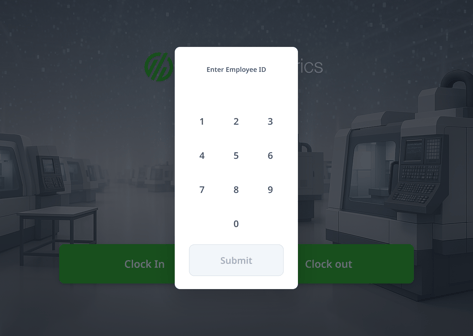
PIN verification is now available at operator sign-in. For facilities using kiosk-style deployments or shared terminals, PIN authentication gives operators a fast, secure way to identify themselves without relying on badge scanning or manual selection.
ShopPulse is now available in Korean. Localization matters for floor-level adoption, and Korean joins an existing set of supported languages with more on the roadmap.
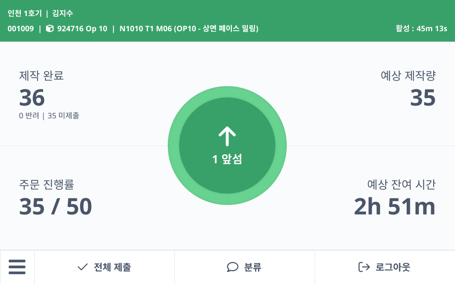
Clock-out flow visibility is also now configurable per deployment, giving facilities more control over the operator experience at the end of each shift.
A Smarter View of What Comes Next: Job Changeover Dashboard
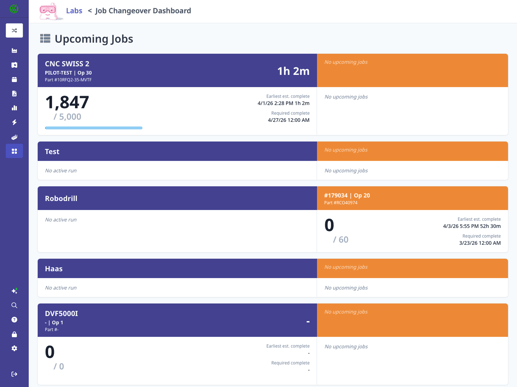
Available now in Labs, the Job Changeover Dashboard gives tooling departments and supervisors a real-time view of which machines will finish their current jobs first, sorted from earliest to latest completion.
The value is straightforward: knowing what finishes next means tooling can be kitted and staged before a machine goes idle, not after. For facilities running tight schedules across multiple machines, reducing changeover idle time has a direct impact on throughput.
The Job Changeover Dashboard requires an ERP integration and the Dispatch Schedule. It is available to all customers via Labs today.
Beyond the product releases, two events in Q1 gave us a chance to test something bigger: whether customers and partners could build real applications on top of MachineMetrics. Here is what we found out.
ProveIt! 2026: An Early Look at What This Platform Is Becoming
ProveIt! is one of the more unforgiving competitive environments in the industry. Fifty-one vendors. Live virtual factories, intentionally messy and incomplete. Four questions you have to answer on stage with a working demo: What problem did you solve? How did you solve it? How long did it take? What did it cost? No polished slide decks. You prove it or you don't.
Bill dove in with two weeks to prepare, one applications engineer for support, and a factory assignment well outside our core verticals: a multi-site beverage bottling operation. Not a CNC machine in sight.
The team connected to a manufacturing environment they had never worked with, configured Max AI to understand beverage production using our Knowledge Hub, and built a custom operator interface from scratch. The framework used to build that operator interface in days rather than months is what became Carbide.
ProveIt! answered whether the platform could stretch. It could. That result is what motivated us to host Production Lab the following month and put the same question directly to our customers.
Read Bill's full ProveIt! recap here!
Production Lab: Customers Built on the Platform in 48 Hours
In March, we brought five customers together to build real applications on top of MachineMetrics using live data from their own operations. In two days, every team left with a working solution.
The range of what got built made the point. A continuous improvement specialist with no coding background built a production-embedded application solo. A customer built the first commercial deployment of MachineMetrics' tool offset data visualization, largely by himself. A decade-long gap in production intelligence was closed in 48 hours. A seven-figure cost savings initiative was made actionable. A daily management system touching every person in operations, across four tiers and multiple sites, went from concept to working prototype.
Production Lab answered the question the platform story raises: can customers actually build on MachineMetrics? The answer, across five different companies, skill levels, and problem types, is yes.
What made it possible is Carbide, our manufacturing app framework currently in beta. Carbide gives customers, partners, and our own engineers the building blocks to create shop floor intelligence applications on top of MachineMetrics using live machine data. If building on the platform is something you want to explore, reach out — we want to hear from you.
Read the full recap here or watch the video below.
What's Coming in Q2
MES Setup and Auto Job Match are on track for Q2. MES Setup brings structure to machine setup — one of the most inconsistent parts of the production day — giving operators and supervisors a real-time view of what a job requires before production begins. Auto Job Match removes the manual coordination required to start a run by automatically matching jobs to machines, so the floor keeps moving without waiting on a planner.
Max AI is expanding. The Knowledge Hub, which launched to an initial customer cohort in December, is rolling out more broadly. We are also looking to release Shift Handover and First Article Inspection in Q2, bringing AI-guided intelligence to two of the highest-friction, most manual workflows in the production day.
IMTS 2026 is the platform showcase moment for the full year. If you want to see where this is all heading, that is the place to be.
If you have questions about any of the releases above or want to see how they apply to your operation, reach out to your customer success team.